Women Architects and World Fairs

Category: ARTH 851 Fall 2026 (Page 5 of 7)

Getting Permission: Who has the right to make archives public?

Codex Zouche-Nuttall (source: Michel Wal, GFDL, via Wikimedia Commons)
Week FOur, 9/8/2026

This week, we’re thinking about developing digital collections, and the issues posed by using photos that do not necessarily belong to you. It’s easy to see the connection between these two topics—in order for students to utilize programs like Omeka to create class projects, they often have to pull images and other files from outside sources, like archives and museums. While I was creating my Omeka project as an undergrad, I was lucky enough (or perhaps unlucky enough?) to have photographed and processed all of those images myself, such that our readings which outline scholars’ general anxiety about permissions and images surprised me. 

Once again I’m drawing from my own experience with Omeka, which can be viewed in my projects page.

However, an issues report on “Copyright, Permissions, and Fair Use among Visual Artists and the Academic and Museum Visual Arts Communities,” sponsored by CAA, detailed quite convincingly that not only are the majority of scholars anxious about using images, but that this anxiety can really hinder research. The report notes that scholars simply are unaware of how copyright law actually functions, and therefore that their “work is constrained and censored, most powerfully by themselves, because of that confusion and the resulting fear and anxiety.”1 (CAA Report, 7) 

Much of the report is spent advocating for the understanding of fair-use images, and images in the public domain. Essentially, while scholars might be worried that they’d face legal repercussions for not gaining permission to use a specific image, oftentimes they are well within their legal right to use said image under fair-use policy. I imagine this is equally, if not moreso, the case for students who create publicly available projects as part of their coursework. In those cases, there’s a clear educational motive behind the use of whichever image.

One such example is the work done by art historian Lauren Kilroy-Ewbank, who began implementing Omeka into her classroom to explore the pre-Columbian Mixtec Codex Zouche-Nuttall.2 In her article, “Doing Digital Art History in a Pre-Columbian Art Survey Class: Creating an Omeka Exhibition Around the Mixtec Codex Zouche-Nuttall,” Kilroy outlines how and why Omeka specifically was her collection-builder of choice for students. The interface is fairly beginner-friendly (though it definitely has its frustrating aspects) and students can organize different pages under one larger exhibition. This means that although each student was learning and writing about the same Codex, they would make their specific page about only one aspect of the codex—say, one specific symbol or theme.

Further, this visually-forward platform allows art history students to equally value images and text as aspects of their scholarship, which is sometimes lost in traditional essays. Kilroy also mentioned that she had an assignment which trained students in DublinCore, the language conventions widely-used by archivists. I thought that not only was this a potentially useful skill for the job market, but also that it’s a great way to get students thinking about some of the fundamentals of art objects. “What is this object made of?” and “what is it used for?” might appear to be an obvious question, but it is essential that we begin with those considerations when we’re discussing art objects. 
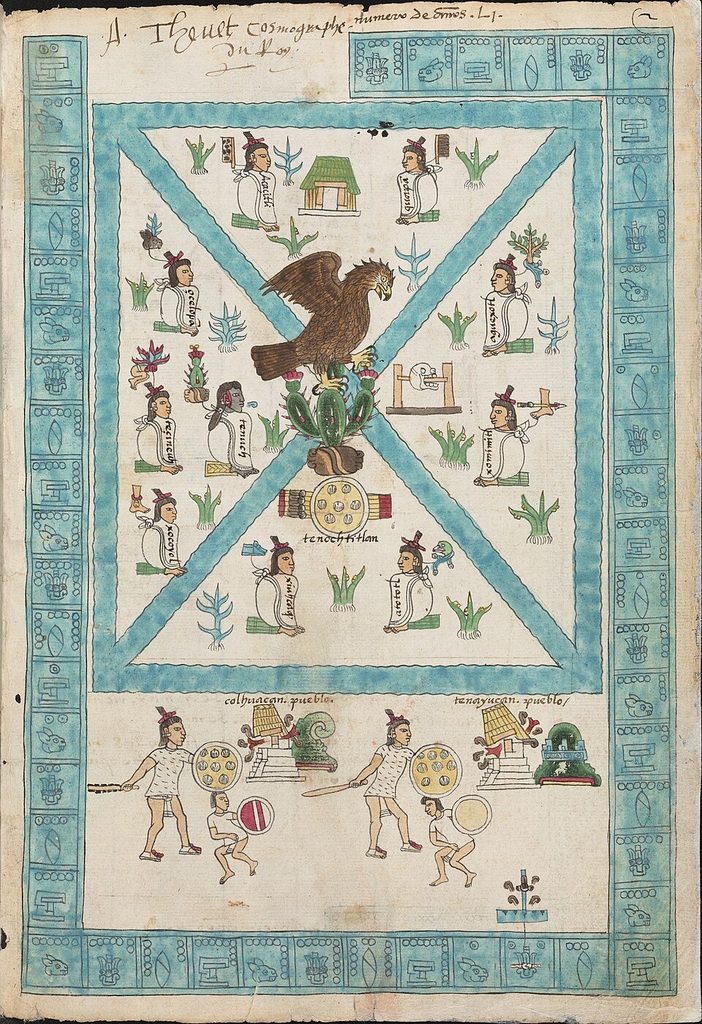
Codex Mendoza (public domain via Wikimedia Commons). Note: I was lucky enough to handle a real codex, very similar to the early-colonial era codex seen above, at the Benson Latin American Library while I was a student a UT Austin. It was pretty awesome.

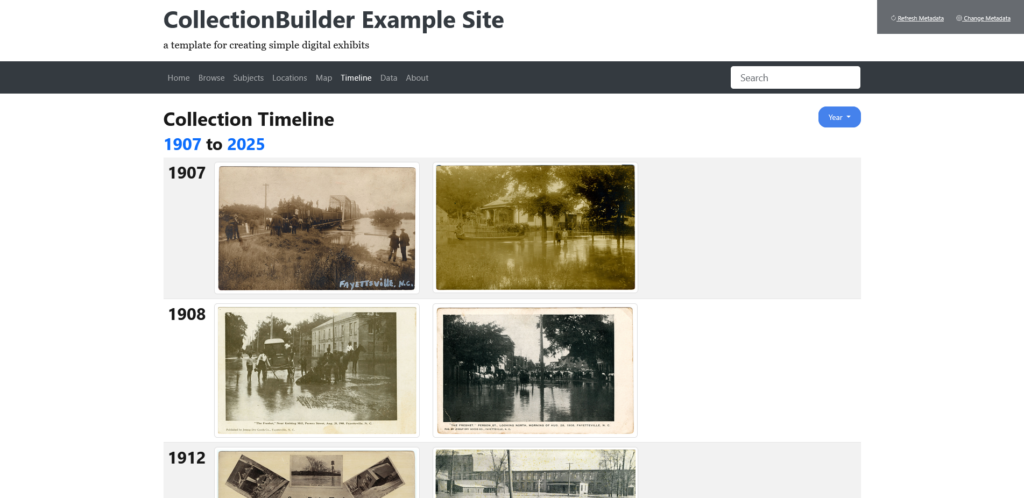
Finally, in class this week we began to explore CollectionBuilder, an open-source model for creating digital collections using metadata and linked files. Like all good digital art history tools (see Omeka above), CollectionBuilder is free and open to use by the public. A similar model to this can be found in ArchivesSpace, which is also open-source, but is more focused on internal data management rather than user interface, and is most often used by institutions as opposed to individuals. CollectionBuilder finds much of its strength in its relative accessibility, and seems to be most useful for pulling public domain and fair-use files from different sources to be compiled in one exhibit. Another strength of CollectionBuilder is the built-in user interface: it’s simple but effective, and it automatically creates a timeline.

It must be said, however, that the biggest weakness of CollectionBuilder is the fact that it relies heavily on HTML coding. Despite the digital prowess and training that archivists generally have, often those abilities manifest in their use of specific programs like the aforementioned ArchivesSpace, or the popular TheMuseumSystem. Further, us art historians often seem like luddites in comparison to our more computationally-minded colleagues in the archives, meaning that CollectionBuilder’s heavy reliance on code is even more of a barrier to access. While I understand that one cannot ask too much for a free-to-use and communally created software, the fact that users have to navigate code and coding in order to develop a collection makes the software somewhat more inaccessible. Even so, I am excited to start building my own collection using CollectionBuilder, with my fair-use and public domain images of course!

  1. Patricia Aufderheide, et al. Copyright, Permissions, and Fair Use among Visual Artists and the Academic and Museum Visual Arts Communities: An Issues Report (College Art Association, 2014) ↩︎
  2. Lauren G. Kilroy-Ewbank, “Doing Digital Art History in a Pre-Columbian Art Survey Class: Creating an Omeka Exhibition Around the Mixtec Codex Zouche-Nuttall,” Journal of Interactive Technology and Pedagogy, no. 12 (February 2018) ↩︎

What makes a successful digital collection?

While I had some cursory knowledge about digital collections and exhibits, it was great to take this week’s topic as an opportunity to really dig into what goes into making them work well. In her article “Doing Digital Art History in a Pre-Columbian Art Survey Class: Creating an Omeka Exhibition Around the Mixtec Codex Zouche-Nuttall,” Lauren G. Kilroy-Ewbank very clearly lays out her thought processes for why Omeka is such a great tool for teaching her undergraduate students how to think on a deeper level about both the Mixtec Codex Zouche-Nuttall and the ways in which its presentation affects its meaning. The codex’s nonlinear and non-textual narrative is uniquely suited to the benefits a digital exhibit can offer; it is a highly visual and modular presentation method. Pieces are easily rearranged, recontextualized, annotated, described, and compared. Working in Omeka right off the bat, while sometimes challenging for her students, also acts as a digital veil-lifting of sorts; as beginner students of art history, it is likely that many of these students have done most of their artwork viewing digitally. By having students investigate and explore metadata on their own, it immediately becomes apparent that everything they had seen about artworks online previously has been highly constructed, and suddenly every decision made from the classification of the object down to the digitized image itself becomes apparent. I had never thought about using this process as a pedagogical tool, but Kilroy-Ewbank makes an excellent case for using this type of digital curation to teach both textual and metatextual readings of artwork.

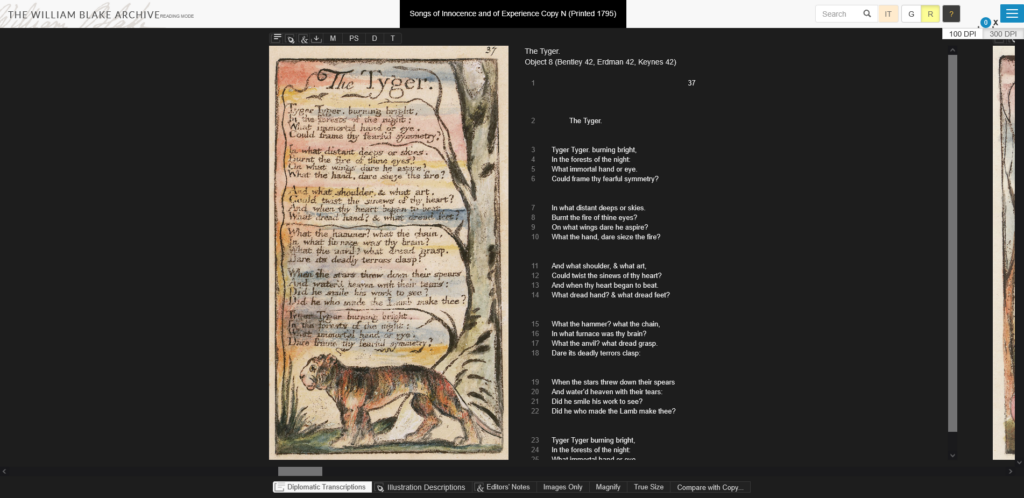
We also took a look at the William Blake Archive, which is a digital collection of both the poetry and visual art of William Blake maintained by the UNC Chapel Hill Libraries and ITS. The site contains both a searchable/browsable collection of his works as well as curated exhibitions with interpretive commentary from scholars. This archive is laid out very thoughtfully, and I particularly enjoyed looking at the documentation for the project! I had never seen a project lay out their past and present standards so clearly before, which is a shame because transparency is something that many archives are trying to improve. Not only does transparency help other institutions and collections know what you have (and its quality) so that your collection can be advertised via word of mouth, it helps build trust from your users when they can see how you decide what should be included in the collection and who took part in that decision-making. I also thought that the interface was well-chosen since it allows the user to toggle between written and visual information via a “gallery” and “reading” mode. When viewing a piece, the list of related pieces (with thumbnails) in that same series is also available below the main image viewer.

The William Blake Archive in “Reading” mode.

And, to make comparison even easier, the site has a lightbox feature! After hearing about how the lightbox of slides is a dying method of building theses in art history, I appreciated that the developers of this site still saw its value. Of course, it’s not a perfect site by any means (some of the dropdown menus could be better streamlined, etc), but as far as a custom-built interface for a narrowly-focused collection goes, this was a good one. I feel like I’m always saying that whenever anything isn’t tailor-made to a collection, no matter whether it’s something technical like a collection interface or something more bureaucratic like policy, it definitely shows. And while I’m not a scholar of William Blake, I can easily see how this resource would be a staple reference to return to. 

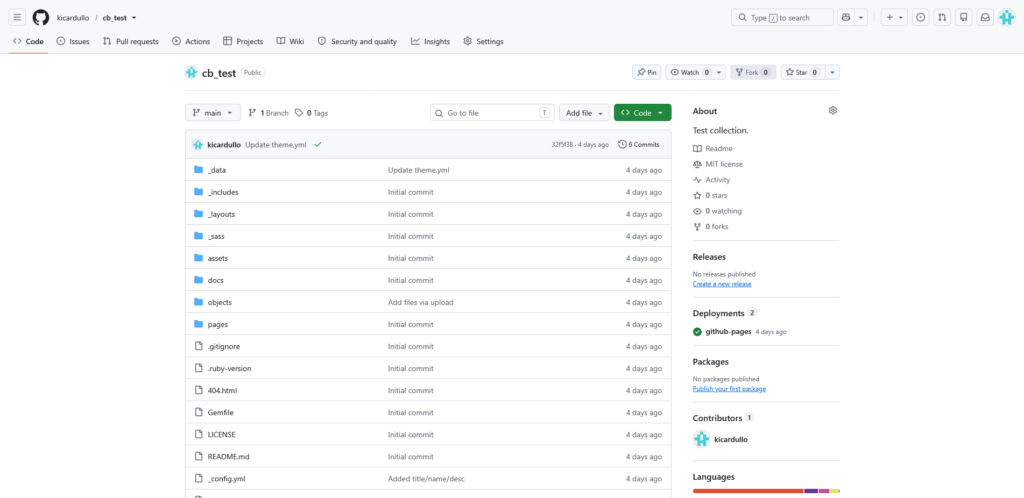
After looking more deeply at what makes a good digital tool, we also started out on our first project: to make our own mini-exhibit in CollectionBuilder. I had heard of CollectionBuilder before, and it was actually a system we had considered using in my practicum project (organizing, cataloging, and partially scanning hundreds and hundreds of slides encompassing 50+ years of work from Chapel Hill-born photographer Avery Danziger) but ultimately decided not to use because we didn’t believe it would be sustainable long-term for the artist to run on his own (and he preferred an offline system). I somewhat regret that now after seeing how easy it is to build, and it would have worked great with his goals of being able to view his work by subject, date, and location! I was kind of shocked at how easy it was- all you really have to do is have a GitHub account, make a copy of the template containing the source code and file directory, and link up a google spreadsheet to let that data populate on the site. It’s pretty difficult to mess up, and you don’t need to do a ton of ground-up web design to make it usable- plus it’s even open source! The basic template allows for browsing by a number of different methods (via map, subject, date, and even just in a list), which is a feature I have particularly appreciated on all of the collection interfaces I’ve found to be successful. No gimmicks, just clear, thorough metadata that offers a few predetermined ways of getting a collection overview. So, in a user experience sense, I really like CollectionBuilder.

The timeline from the example site we built in class with a test dataset.

I do, however, see a few drawbacks with it. Firstly is that it is entirely dependent on GitHub, which is a for-profit company now owned by Microsoft. If you know anything about digital preservation, you know that this can put a huge wrench in longevity plans- it’s unclear how long Microsoft will continue to support GitHub or what would happen to it if Microsoft decided to abandon the site. It seems to be safe for the foreseeable future because it is a massively popular code repository (that even a lot of digital preservation tools are hosted on!), but as with anything for-profit, longevity is not guaranteed. Secondly, without coding experience, it can be difficult to change the basic template sites to something custom. From what I understand from looking at the documentation (I am not a code-minded person!), the benefit of using Jekyll as a basis for your site is that it takes a lot of the work out of coding an HTML site from scratch by using layouts and modular blocks. This is both a pro and a con- it’s fool-proof to use, but ultimately you’re kind of limited by what you’re given to work with.

The CollectionBuilder file directory for the template in GitHub. Kind of scary if you don’t know what you’re looking at.

As I work more in CollectionBuilder this week, I’ll be curious to see how my opinion changes!

Kilroy-Ewbank, Lauren G. “Doing Digital Art History in a Pre-Columbian Art Survey Class: Creating an Omeka Exhibition around the Mixtec Codex Zouche-Nuttall: Doing Digital Art History in a Pre-Columbian Art Survey Class: Creating an Omeka Exhibition around the Mixtec Codex Zouche-Nuttall.” Re-viewing Digital Technologies and Art History, February 21, 2018. https://cuny.manifoldapp.org/read/doing-digital-art-history-in-a-pre-columbian-art-survey-class-creating-an-omeka-exhibition-around-the-mixtec-codex-zouche-nuttall-9ecc5e1c-2062-4cd4-9ede-a7589404cd17/section/2ec0cf43-4333-4c25-aeba-d9aefb521d3b.

Relevance Searching for Images Using Different Platforms

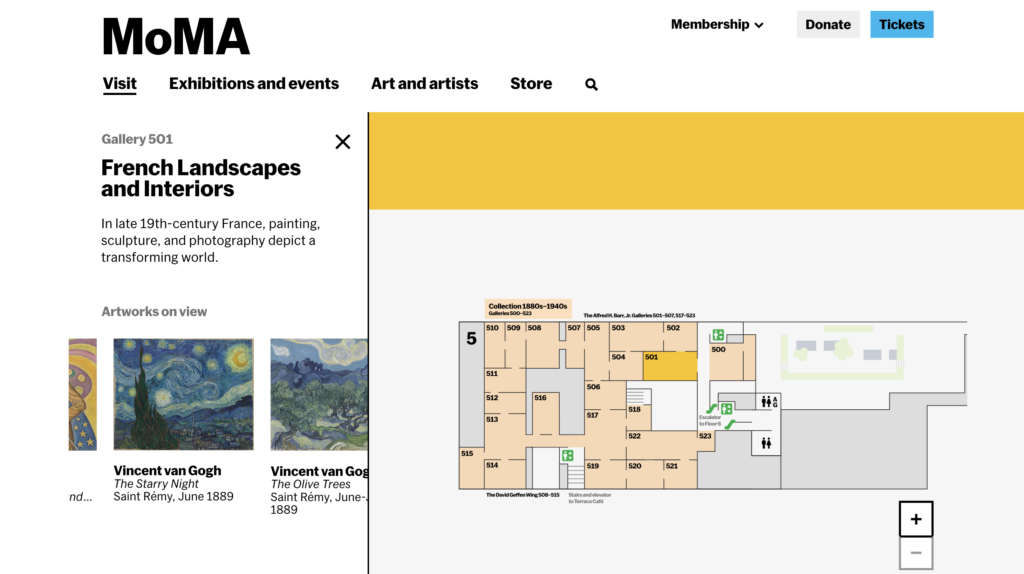
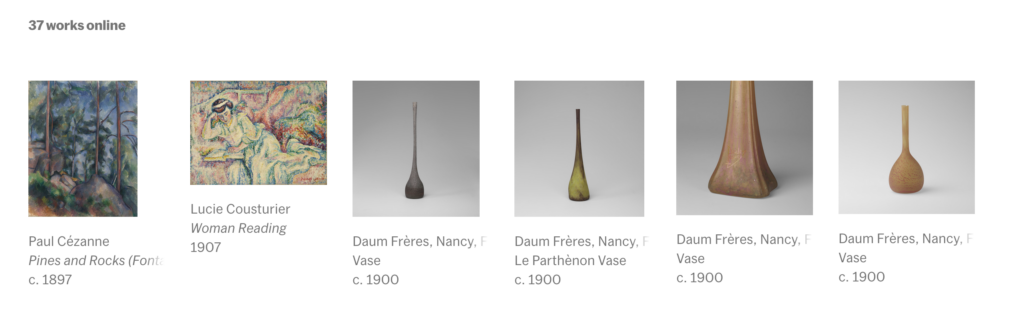
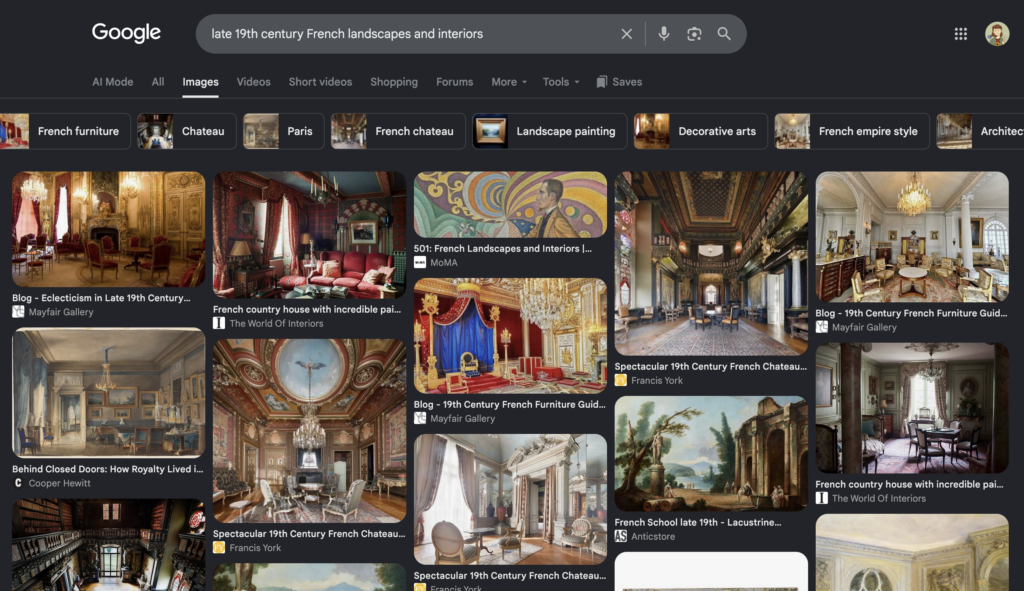
Google has been around since 1998, but I recently found out that Google Images has only been around since 2001. Even further, reverse image searching was only added as a function to Google Images in 2011. The internet seems so built around images, but search functionality is entirely built on text infrastructure. Finding relevant images with a Google search is a game of careful search engine optimization and it is a game that the user has to master. Finding relevant images from a search inquiry is a skill that we have come accustomed to, but are there other ways we can find images? Consider a museum as an analogy to consider alternative image search options. We may go to the MoMA looking to see Starry Night and Starry Night only. We can go to the help desk and inquire, “where is Starry Night?” and we would get an exact answer to find our image. This is akin to a traditional text-based image search inquiry. Consider instead someone who is interested in seeing late 19th century French landscapes and interiors. Upon inquiry, they will be delighted to know that someone at the MoMA has already curated an entire gallery of works that are relevant to their needs. Their inquiry is more broad, so with a traditional image search inquiry might produce a wide variety of results ranging in relevance. Importantly, in a traditional search, the user has to vet these images for relevance. In the museum example, the curator of the museum has already done the vetting. The museum has eliminated the possibility of finding irrelevant works. Intentionally curated image collections change how we are able to find relevant images.

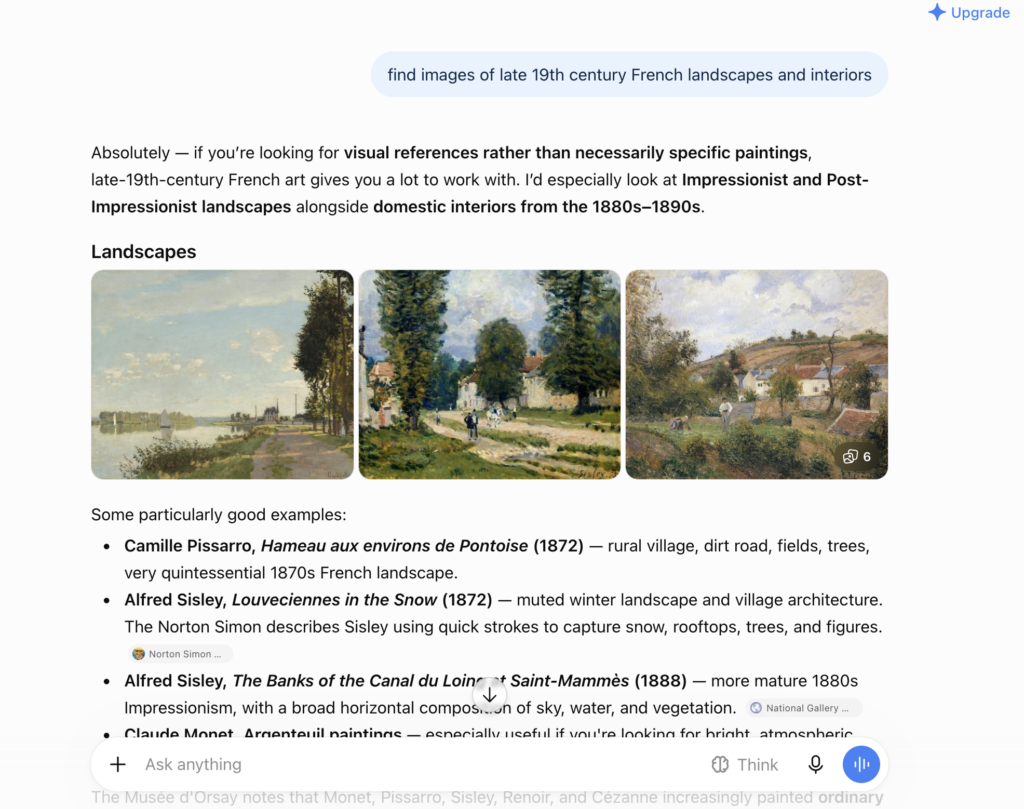
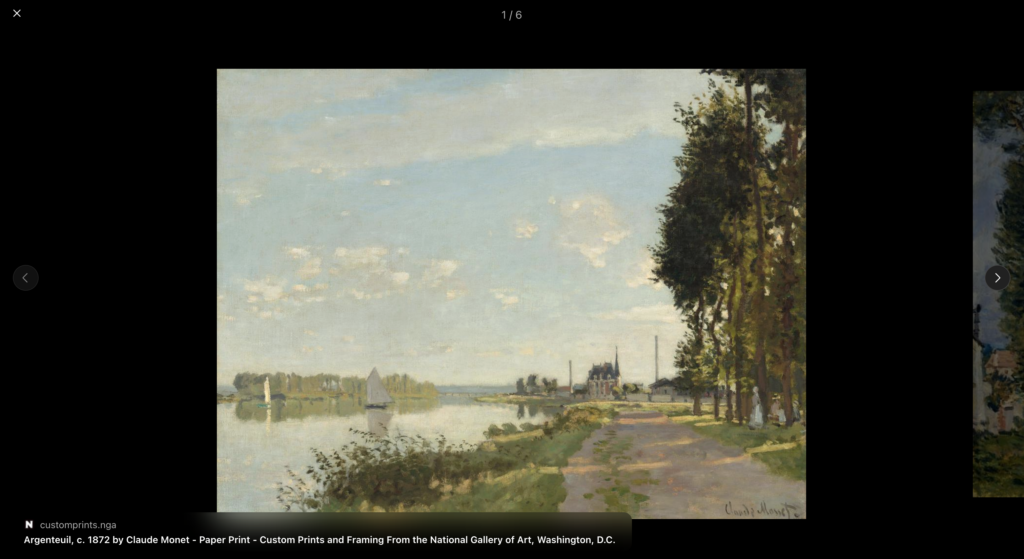
For this blog post, I will explore how search image results vary depending on which platform the inquiry is made. The search platforms I will use are Google, the built in search function on the Museum of Modern Art website, and ChatGPT. I then will assess the results for their relevance to the inquiry, their ease of use, and any other noteworthy observations. For consistency of results, I will use the same search inquiry for all platforms: “late 19th century French landscapes and interiors.”


The Museum of Modern Art

Screencapture of Museum of Modern Art Map https://www.moma.org/visit/guide/map?location=501. Accessed September 13, 2026.
Screencapture from Gallery 501 https://www.moma.org/calendar/galleries/5695. Accessed September 13, 2026.

The Museum of Modern Art, like many museums with an online presence, have digitized the pieces from their on-display collection.


Google


ChatGPT

Digital Art History in the Undergraduate Classroom

            Lauren Kilroy-Ewbank’s article “Doing Digital Art History in a Pre-Columbian Art Survey Class: Creating an Omeka Exhibition Around the Mixtec Codex Zouche-Nuttall” unites the themes that we have been discussing as a class since the beginning of the semester.[1] Within her experimental integration of digital art history into a Pre-Columbian art survey class, Kilroy-Ewbank notes the challenges, successes, and potential for using a digitally centered project as a part of her pedagogical methodology. We can see the product of educating students in building digital repositories through interfaces like The William Blake Archive. Introducing digital tools to practice digital art history earlier in art history students’ educations will facilitate new and innovative projects.

            The objective of Kilroy-Ewbank’s project for her students was to create an interactive digital exhibition investigating various characteristics of the Pre-Columbian Mixtec Codex Zouche-Nuttall. Kilroy-Ewbank explained that students often had trouble understanding the pictorial nature of written Mixtec communication. She saw the creation of this interactive exhibition as a method for students to meaningfully interact with the piece in order to achieve greater comprehension of the work as well as Mixtec art and communication more broadly. By dividing students into teams to learn how to create their exhibit from a new digital tool, Omeka, she made collaboration necessary to the classroom rather than the more traditional research paper completed individually.

            Alison Langmeade also wrote about how digital art history encourages collaboration in her example of the University of Pittsburgh’s Visual Media Workshop (VMW).[2] Through this organization of students, Langmeade explained how the VMW allowed students to collaborate on projects together rather than conduct research in isolation. Kilroy-Ewbank’s Omeka project for her students functions in the same way. She notes that even outside the project, she encouraged collaborative research and study made possible by Google Apps suitable for sharing notes with whole classes. She also acknowledges, like Langmead and Paul Jaskot, that digital analysis is useful for macroanalysis and for finding spatial and temporal patterns in works but that it is the human’s responsibility to explain the pattern.[3] The pictorial nature of the Codex Zouche-Nuttall also lends itself to be analyzed and explained well through a digital project.

            Without knowing a lot about the Codex Zouche-Nuttall itself, its overwhelming amount of images remind me of Hieronymus Bosch’s Garden of Earthly Delights. Last week, I also mentioned Bosch’s work and the Netherlands’ subsequent digital humanity project that creates an audio-visual experience where the user can zoom in and click on details for further information.[4] I can imagine students creating a similar digital project for the Codex Zouche-Nuttall. Kilroy-Ewbank notes how students were responsible for collecting comparative images and the potential to integrate geographical or topographical data into their exhibitions. The practice of creating, arranging, and constructing a digital exhibition not only allowed students to create a unique research project to learn more about a piece of Mesoamerican history, but it also introduced undergraduate students to digital tools to disseminate scholarship in an age inundated with digital images.

            One challenge that Kilroy-Ewbanks noted was students’ frustrations with using Omeka, a completely new tool for them, and the ensuing awkwardness or inconsistencies that manifested in the resulting exhibition. I am experiencing similar frustration technological frustration while using the digital repository-building tool, Collection Builder through GitHub. During my undergraduate studies, I had taken classes that did involve aspects of digital humanities and digital art history, but I mostly participated in the research and scholarship rather than the digital construction.

While studying abroad in Rome, Italy, I worked with fellow students in a Museum Studies class to create a digital exhibition of fake art confiscated by the Carabinieri de Tutelo di Patrimonio (the site is still active if you would like to check it out! Deception by Design: Lessons from Forgeries). A graduate student constructed the digital exhibition, while the undergraduate students researched and wrote about the objects. In her class, Kilroy-Ewbanks required the students to also be involved in the maintenance of metadata and construction of the digital exhibition.

            The creation of digital exhibitions and repositories like The William Blake Archive are helpful for sharing scholarship with a greater public and for creating new scholarship. Kilroy-Ewbanks notes in the conclusion of her article that some of her goals for the Codex Zouche-Nuttall project included having her students learn the importance of sharing scholarship and the fact that history is created through thoughtful research and synthesis. The William Blake Archive is an early example of a digital project aimed at increasing access and generating scholarship related to the art and writing of William Blake. Starting in 1995, The William Blake Archive unites the works of Blake across several repositories and features rotating digital exhibits that highlight different aspects of Blake’s lifetime as an artist, like an exhibition dedicated to his work in Sussex for William Hayley or his drawings of the pilgrims in Chaucer’s Canterbury Tales. The William Blake Archive is a great example of the past of digital projects, but it also inspires the future for even better digital repositories.

            The William Blake Archive is not without its faults. Likely because of its long life, issues of maintenance and uniformity inevitably become issues as contributors and editors come and go. I think that as more scholars experiment with creating digital tools, upkeep and maintenance will prove to be an important factor to consider as the life of the project persists.  

            Integrating digital art history methods into undergraduate art history curriculum, like Kilroy-Ewbanks’ assigned project, allows art history to adapt to the digital world. As scholarship is almost entirely shared and produced online, it is important for students of art history to learn about helpful digital tools for their own research interests—technological frustration and all.


[1] Lauren G. Kilroy-Ewbank, “Doing Digital Art History in a Pre-Columbian Art Survey Class: Creating an Omeka Exhibition around the Mixtec Codex Zouche-Nuttall,” Journal of Interactive Technology and Pedagogy, no. 12 (February 2018).

[2] Alison Langmead, “Art and Architectural History and the Performative, Mindful Practice of the Digital Humanities,” Journal of Interactive Technology and Pedagogy, no. 12 (February 2018).

[3] Paul B. Jaskot, “Digital Art History as the Social History of Art: Towards the Disciplinary Relevance of Digital Methods,” Visual Resources 35:1-2 (2019), 26.

[4] Pieter van Huystee Film, NTR, Jheronimus Bosch, the Garden of Earthly Delights (Pieter van Huystee Film, NTR, 2016), https://archief.ntr.nl/tuinderlusten/en.html#.

Take a seat. Please.

This week I explored the digital art history tool imgs.ai and got some interesting results. imgs.ai provides “a Web-based interface, and machine-learning-based backend that allows the end user to both descriptively and visually search arbitrary image dataset.”1 More simply put, it allows a human to guide an application using computer vision to find images in selected museum databases that are the most similar to an uploaded image, text prompt, or both. The idea being that the user will then continue to engage with more images by selecting from the suggested images that are “positive” or “negative,” furthering the search with this new information.2

The ability to mark negative results is where I hit my first issue: it wasn’t an option for me. This is likely because I was using the site without a login (getting one takes days for approval). While I understand the necessity of gatekeeping databases in the age of AI scraping and how intentionally using AI is fundamentally different from random bots shutting down your site, the irony of the website being protected being built on AI scraping images was palpable. How many of the models imgs.ai uses were built using the same tactics the required login was keeping out? Even if copyright was the driving force instead of defense against bots, how many artworks outside of these museum collections had their copyright violated to train the models to “see”? I am not anti-AI, but I think they are questions worth asking. A team that calls out “Transparency” as one of five “essential criteria”3 should say more about the black box components at work beyond naming the databases or models used.4 Minimally, it should give an explanation of why options are locked behind sign-up instead of forcing the user to guess.

I also wouldn’t be as harsh in my critique if imgs.ai as a tool had provided me an experience that felt more like what the article outlined. To show where imgs.ai gave me interesting results and where it fell short, let me walk you through my experimental searches.

I started with the image from Vermis I: Lost Dungeons and Forbidden Woods I digitized in my last post.5

A pixelated image of a skeleton kneeling and being hugged by a kneeling armored person.
[Scanned image from Vermis I]. plastiboo, Vermis I: Lost Dungeons and Forbidden Woods, 11th printing, 2026. Used here for educational and commentary purposes; no copyright infringement intended. All rights remain with the original owner.

I knew this wouldn’t necessarily be an easy image with its dithered graphics, but I thought it was fair to work with an image I am actively using in my art history study. While imgs.ai can only show results from the databases it has access to, unlike some other digital art history projects, it does not limit itself to a specific time period or type of art. So I didn’t expect it to return other video game related results necessarily, but I did expect it to be able to get an accurate read on the image’s general contents since testing it with an AI alt text tool had produced flawed but not totally off-base results.

imgs.ai has four feature extractors to choose from for each search, each with a different focus: “stylistic similarity,” pose, “raw color data,” and CLIP which allows combining an image with a text prompt.6

Results were mostly okay if not super useful until I switched to the pose extractor.

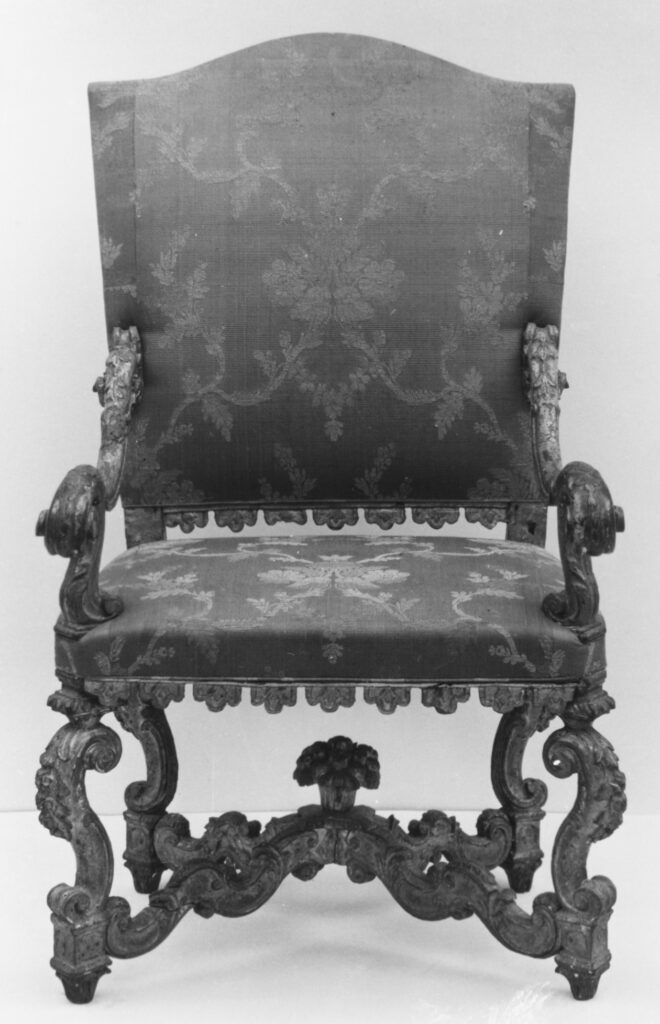
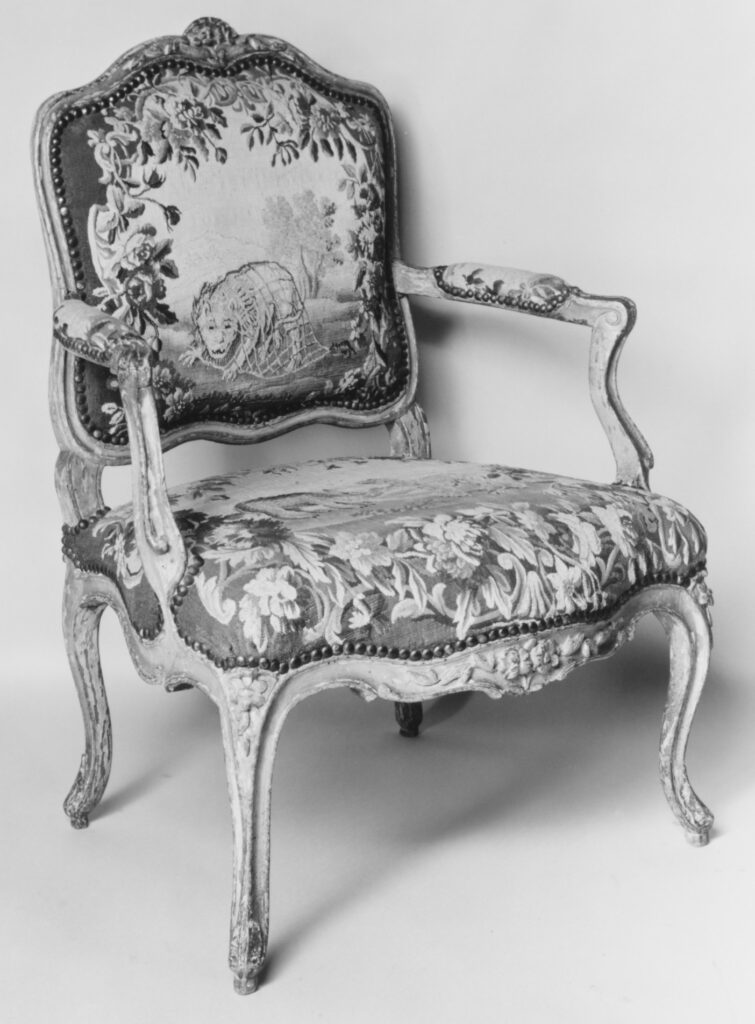
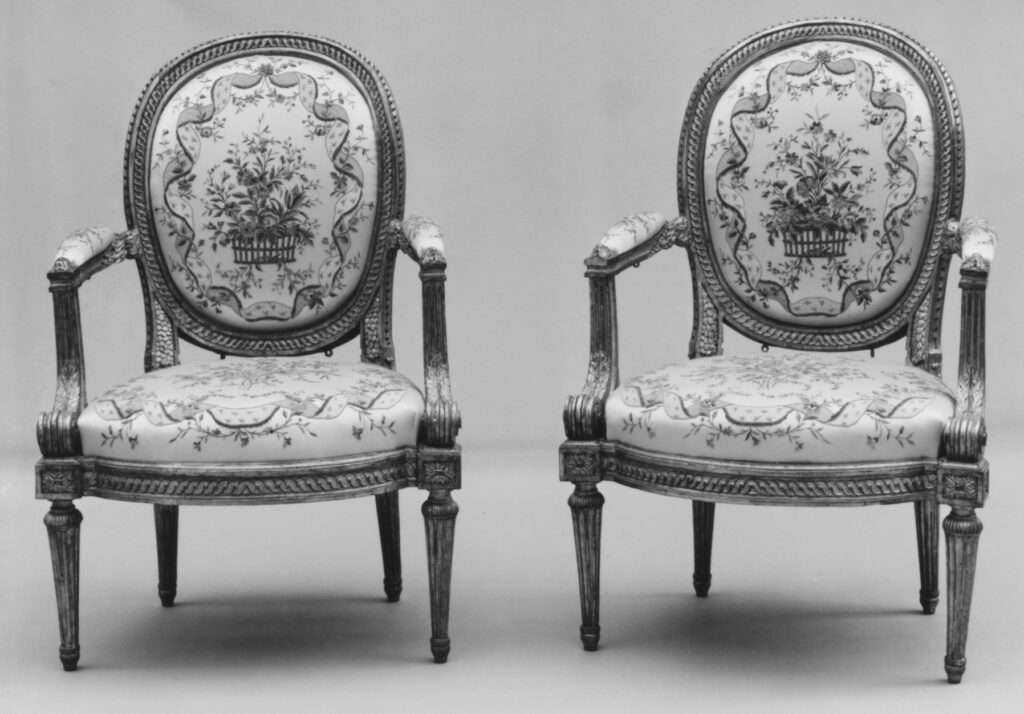
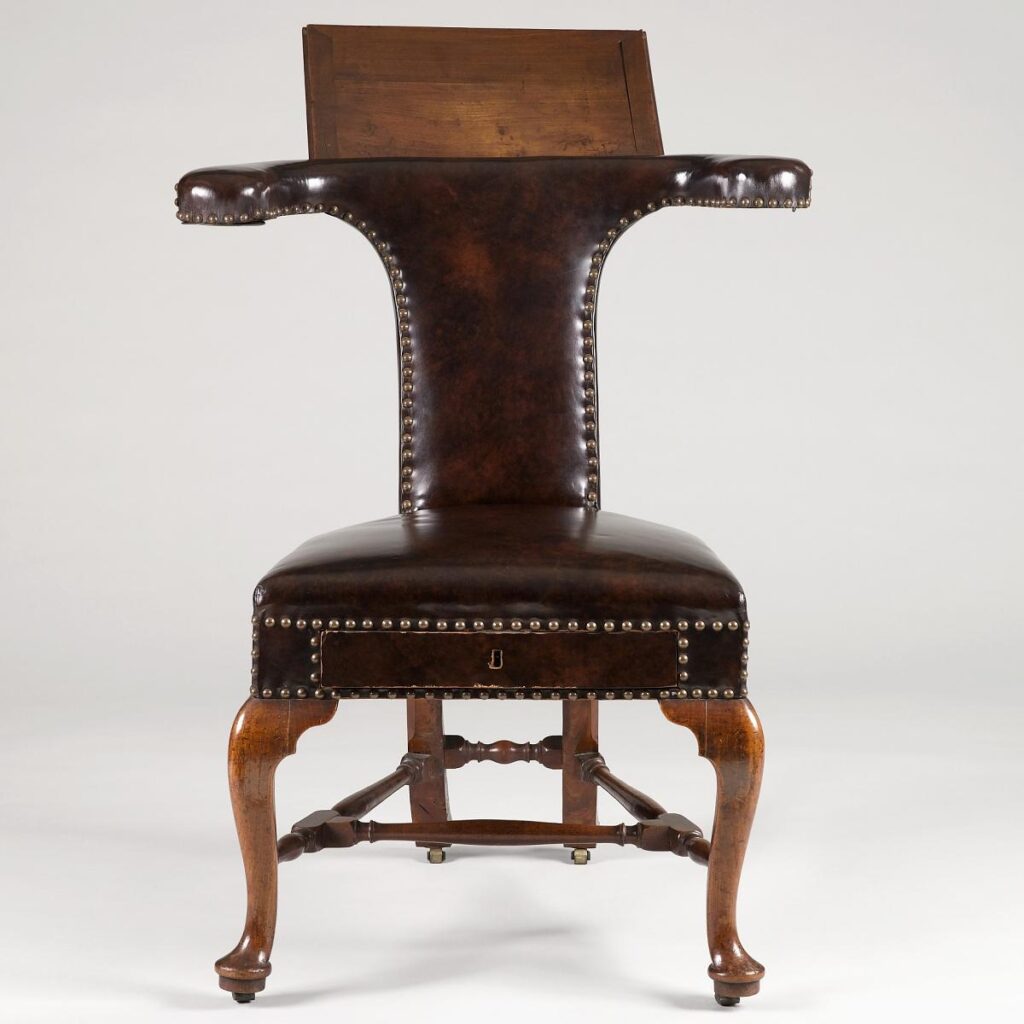
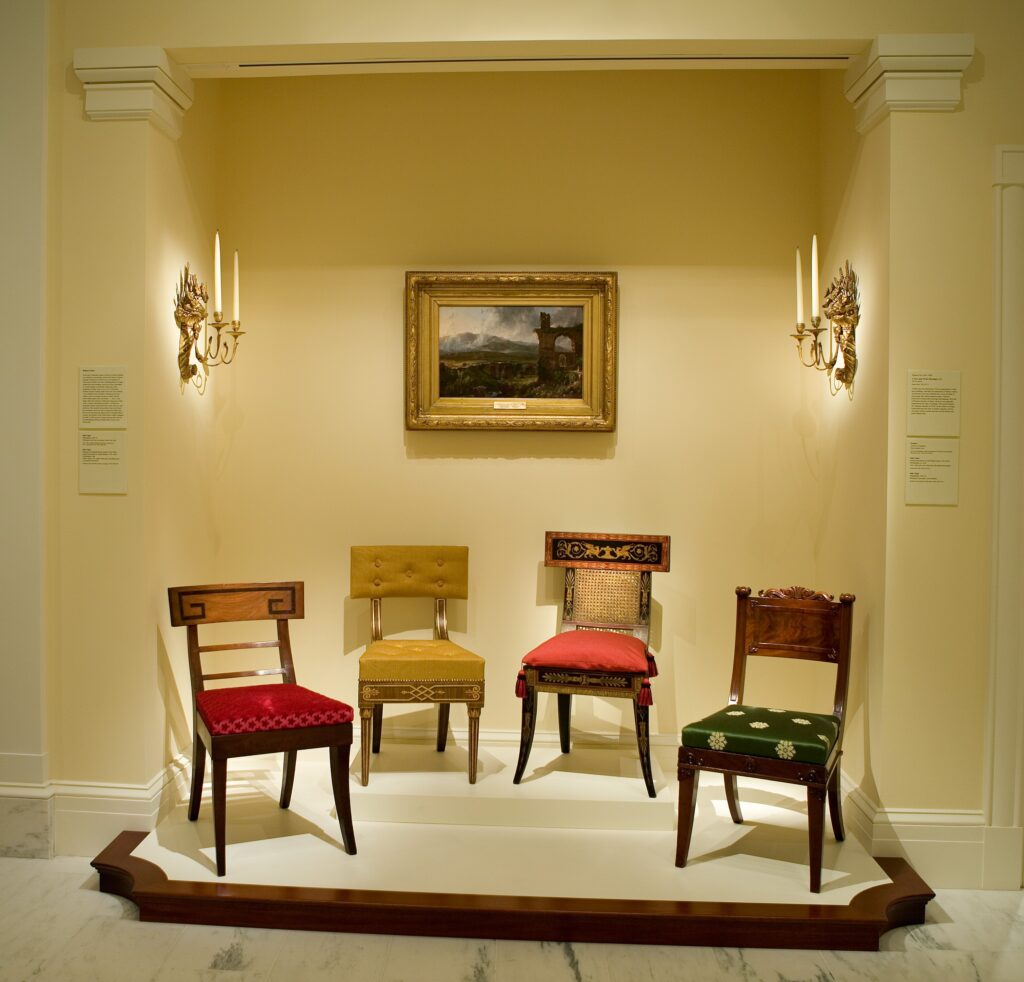
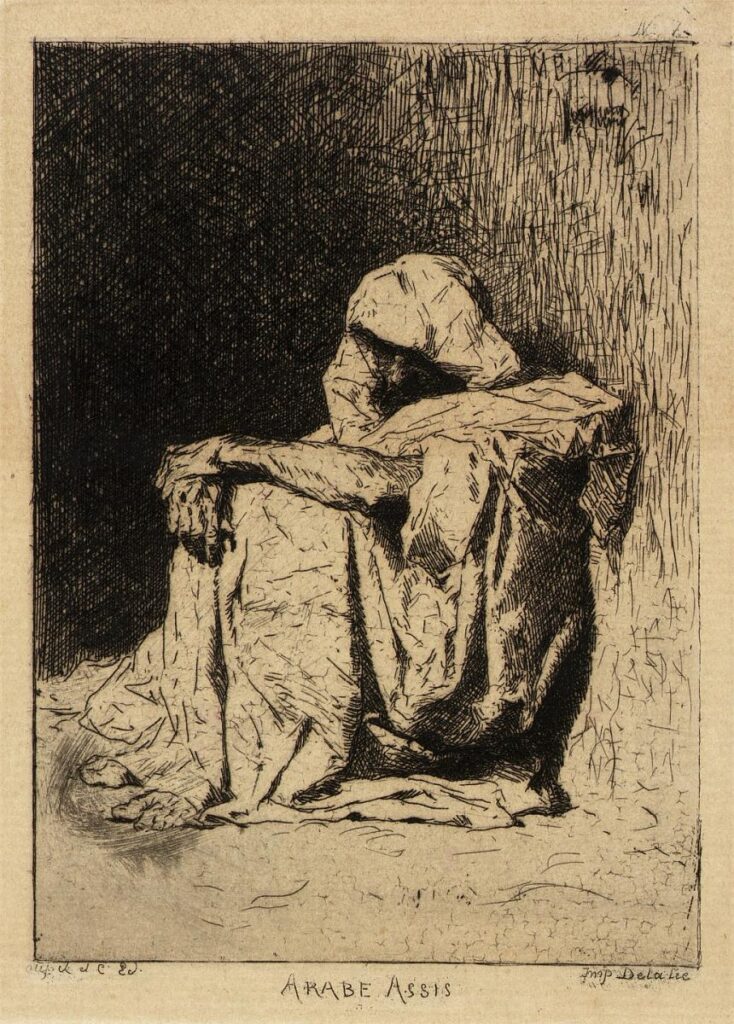
Well that’s a choice. There weren’t only but a variety of objects that had no relation to the pose regardless of the database used. The chairs would take on an added strangeness with my next search though.

I decided to try another image. One I took directly from the Smithsonian collection.

a pixelated title screen for a video game
Ed Fries. Halo 2600. 2010. Video game for Atari VCS, color, sound. Smithsonian American Art Museum. © 2010, Ed Fries. Reproduced for critical commentary on imgs.ai, the tool through which this image was retrieved; not licensed by the artist or SAAM.

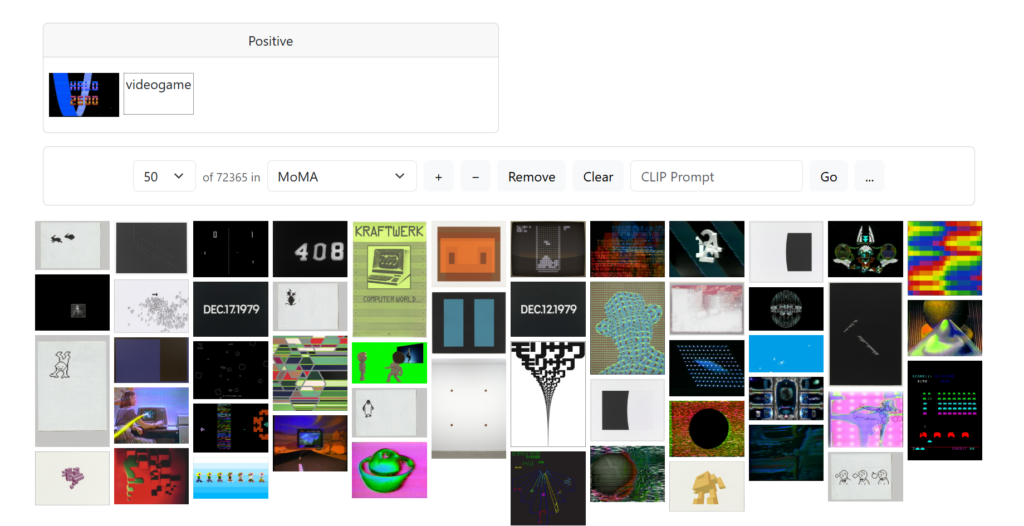
The results were better but still not great. I only got results that were clearly connected to the search image but still novel enough to be useful when I added “videogame” to my CLIP search.

Screenshot of imgs.ai search results for "videogame" and Halo 2600 image in the MoMA collection, showing a grid of abstract and pixel-art thumbnails.
Screenshot of imgs.ai search results for the positive query “videogame” (image: Atari 2600 Video Chess box/screen) within the MoMA collection subset, showing 50 of 72,365 results. Author’s screenshot, 9 Sept. 2026.

All was well until I tried the pose feature extractor again.

an elaborate armchair, one of a pair
Pair of Armchairs. Late 17th–early 18th century. Carved and gilded walnut, with crimson and gold silk cannelé fabric (not original), Italian. The Metropolitan Museum of Art. Public domain.
an armchair with an unidentifiable beast depicted on the back cushion
Manufacture Royale, Aubusson (tapestry weaver). Armchair (part of a set of nine). Mid-18th century. Carved and painted walnut; Aubusson tapestry upholstery, French. The Metropolitan Museum of Art. Public domain.

Oh no.

Ohhhh nooooooooo.

I wracked my brain for the cause of this seating-based poltergeist haunting my results. Was it a similarity of a curve in the chair to the curve in the image? Then why were some of the EXACT SAME CHAIRS in the results from both starting images? Other more obvious connection images were not shared between results.

Away from the chairs, most results made sense as to why they were selected. They just didn’t provide anything useful beyond confirmation that yes, it has that color or a frame or someone in armor. Some images I found really intriguing, and they made me think of my image in a different way. It was most successful again when CLIP added texted to the search, in this case, “Skeleton.”

That was when I realized something important. While the point of imgs.ai is not to have an autonomous AI match images, but rather to include the human user in the research loop actively,7 I was doing the heavy lifting for the AI instead of with it. I was taking an image that seemed random to me and taking on the task of finding the connections and assigning meaning. In some ways, this is great. The human should be the one doing those tasks. But I was also struck that I could have done the same cognitive work and gotten the same benefit if the AI had served me completely random images from the collection and told me they were related to my image.

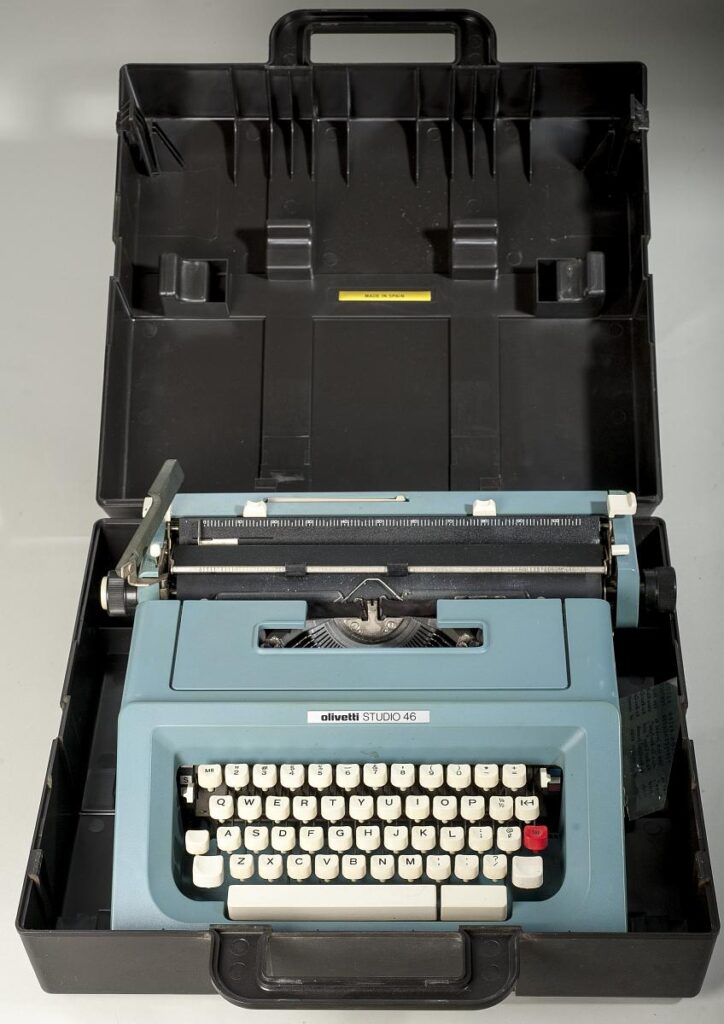
Two more images gave me additional insight into a major issue. Olivia Butler’s typewriter which appeared for both images…

a blue typewriter sits in a black open case
Olivetti Studio 46 Typewriter Used by Octavia Butler. Between 1974 and 1979. Plastic, metal. Anacostia Community Museum, Smithsonian Institution. CC0, public domain.

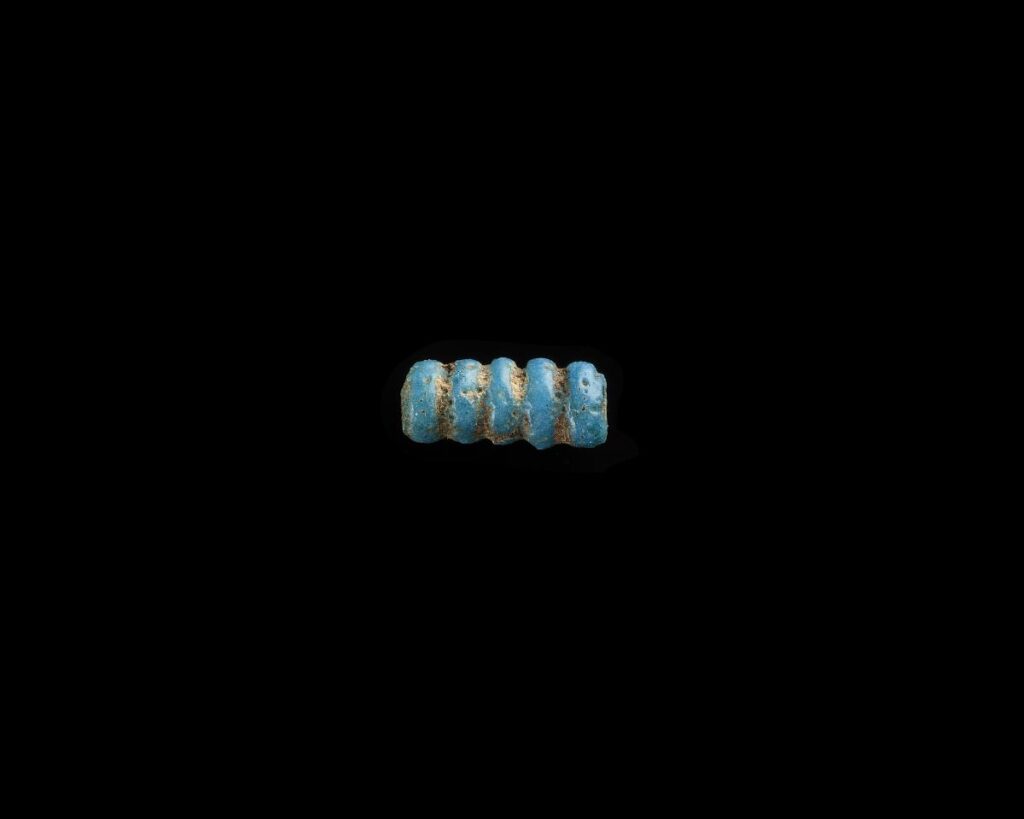
…and the immense amount of beads that showed up search Atari 2600.

a blue and gold bead on a black background
Bead, quintuple. 1550–1196 BCE. Glass, Egypt. Freer Gallery of Art, National Museum of Asian Art, Smithsonian Institution. CC0, public domain.

The computer wasn’t “seeing” the artworks as objects but as the images themselves. So not only was the background included but it was given as much consideration as the art. The tool appears to search hierarchically level parts, not the whole.

Perhaps if I had access to the GRAD-CAM to show me where the AI was seeing similarity,8 I would have had a richer experience, but either I could not find that feature or it was behind the login gate. Ultimately, the need driving the creation of the tool seems valid. But until OpenAI understands (not just consumes) Emma Stanford’s “A Field Guide to Digital Surrogates”,10 imgs.ai will be like building a chair with a staple gun: some chance of surprise success, maybe worth the experience, but you can’t make an Eames with it.


  1. Fabian Offert and Peter Bell, “IMGS.AI.: A Multimodal Search Engine for Digital Art History,” International Journal for Digital Art History, no. 9 (2023): 5.30, https://doi.org/10.11588/dahj.2023.9.91295.↩︎

  2. Offert and Bell, “IMGS.AI.” 5.30.↩︎

  3. Offert and Bell, “IMGS.AI.” 5.32.↩︎

  4. Offert and Bell, “IMGS.AI.”↩︎

  5. Plastiboo, Vermis I : Lost Dungeons and Forbidden Woods : Official Guide, ed. Michele Nitri, with Marco Cirillo Pedri, Vermis 1 (2023; 11th printing, Hollow Press, 2026), Paperback (Regular Edition).↩︎

  6. Offert and Bell, “IMGS.AI.”↩︎

  7. Offert and Bell, “IMGS.AI.” 5.32.↩︎

  8. Offert and Bell, “IMGS.AI.” 5.35.↩︎

  9. Offert and Bell, “IMGS.AI.” 5.36.↩︎

  10. Emma Stanford, “A Field Guide to Digital Surrogates,” in The Routledge Companion to Digital Humanities and Art History, 1st ed., ed. Kathryn Brown (Routledge, 2020), https://doi.org/10.4324/9780429505188-19.↩︎

Balancing Search, Exploration, and Sustainability in Collections Interfaces

This week, we took a more critical look at the process of discovery in collections and what methods are being tested to make it easier to find things in databases of visual information. It was interesting to look at collection access from a user experience design point of view; facilitating use of the materials is what I believe the core function of any collection should be, but often it is swept to the side with the assumption that anyone who gets as far as your search bar already knows exactly what they are looking for. This problem is often further exacerbated by the complexities of searching for images, whose indexing relies almost exclusively on the information found in their metadata. For example, if you were trying to trace the origin of the pigeon-breast silhouette of early 1900s women’s clothing, there is a slim chance that searching “pigeon breast” would bring up every example of this silhouette in a textile collection. In order for a catalog entry to show up with that search term, its cataloger would have needed to add those words to its description in some shape or form via tags, subject headings, or plain-text description. This is where semantic searching comes in, which requires some level of cultural understanding of a query on the part of an information retrieval system and not just simple 1:1 text matching. Unfortunately, while many commercial search engines utilize this function, not many search algorithms in collections management software are advanced enough to do so. 

We looked at two projects in particular that took a machine learning/neural network approach to ameliorating some of these difficulties: “Training the Archive” and IMGS.AI. Both projects center on the central idea of clustering as a form of determining relevance, which they are able to do via image recognition tools that can pull out details such as color, shape, and other purely visual features. To be quite frank, I was not very impressed with the use cases of either of these methodologies. Both projects identify the need for a method of determining visual similarity in search that does not necessarily rely on metadata, and I do agree that this is especially true for large volumes of images, but in my opinion the question of “what can we do with AI tools” seems to have taken precedent over “what problems are people actually having while navigating databases.” IMGS.AI uses sound information retrieval theory with a clever way of instantaneously incorporating user evaluation, but in practice, its interface is highly unclear and essentially amounts to a “hot or cold” game with the database. “Training the Archive” uses a similar clustering system to replicate the knowledge and aesthetic sensibilities of a curator, and while it is true that it was able to pick out some stylistically similar images, I think it’s a bit bold to jump to the claim that it has the potential to become “The Unbiased Curator’s Machine.” It’s an interesting thought experiment, but a very loaded way to present a tool that has its own set of problems with real-world consequences.

The project I thought was most successful was Mitchell Whitelaw’s “generous interface” for the Australian Prints and Printmaking database. With options for guided browsing and search, there are many different entry points into the same collection. In particular, I thought the subjects explorer was a fantastic visualizer for similarity that made image metadata abundantly clear in its interface. The more related a topic was, the more saturated it appears in the sidebar menu, making it very easy to jump between subjects and filter down results. While it requires structured inputs and may not be as flexible as the previous examples, I think the ultimate result is much more navigable and offers more utility to the way people are actually searching and browsing for materials.

The Australian Prints and Printmaking Subject Explorer in action.

I wish more repositories had a way to visualize links between people, organizations, topics, and collections that was so simple to use! The downside to this approach though, as with many tools that yield exciting results, is that it is highly labor intensive and that labor is practically invisible. For each of the 40,000+ works in this collection, each one already had clear, structured metadata with those links between artists and works already established. This is fantastic for a small to mid-sized collection such as this, but this process must be nearly impossible to scale (in a timely manner) for large institutions. For example, the collections I work with at the City of Raleigh currently number at over 35,000+ items accumulated since 1992. I can say from experience that I am constantly updating old descriptions, adding tags and subject headings, creating new scans and photos, and measuring objects in the collection, and there are still at least hundreds of subpar catalog entries that would lead researchers directly into dead ends. And that is just the size of a small local history museum- the North Carolina Museum of History has over 150,000 items in its collection, and huge institutions like the Smithsonian have millions. The sheer amount of labor required to standardize that volume of data is truly astronomical, and I’m not sure how we can create that level of utility and simplicity without either massive funding or the exploitation of GLAM workers- either directly or by training new tools on their work. 

I’ll admit, when searching for more collections interfaces to explore, I had a difficult time finding one to share! Not many had very robust exploration options, and most limited browsing to a collection-by-collection basis. I ended up looking at the collections website for the Indianapolis Museum of Art (my hometown art museum as a child), and found it to be pretty intuitive for browsing. On the landing page, there’s an assortment of featured works along with links for popular searches. I hadn’t seen a museum site that had that feature or that exact wording before, but it shows that they have a knowledge of what bridges already exist between their audience and their collection and a desire to encourage those bridges.

The landing page for the Newfields Collections.

There are also easily accessible sections that show only open access or public domain images. The catalog is extremely clear about copyright, which can be so helpful. Often there is just a vague “the creator owns this” statement on catalog entries that is baked into cataloging systems.

The beginning of 19,000+ results for public domain images.
Note the copyright information near the lower left corner of the photo. When clicked, it links to more information about the copyright of this evening dress.

I also appreciated that you can view past exhibitions from an exhaustive list, and that all works from the exhibition are represented. Most recent exhibition collections also have images of all of the works used where copyright allows, and catalog entries for every image contain information about its copyright. I wouldn’t say it’s a perfect interface, but it does have some pretty solid methods of exploration.

The information page from a recent exhibition at the Indianapolis Museum of Art

Bönisch, Dominik. “The Curator’s Machine: Clustering of Museum Collection Data through Annotation of Hidden Connection Patterns between Artworks.” International Journal for Digital Art History, no. 5 (2020): 5.20-5.35. https://doi.org/10.11588/dah.2020.5.75953.

Offert, Fabian, and Peter Bell. “IMGS.AI.: A Multimodal Search Engine for Digital Art History.” International Journal for Digital Art History, no. 9 (2023): 5.28-5.39. https://doi.org/10.11588/dahj.2023.9.91295.

Whitelaw, Mitchell. “Generous Interfaces for Digital Cultural Collections.” Digital Humanities Quarterly 009, no. 1 (2015).

Using Digital Collections: The New Frontier

            Digital collections are one of the most helpful research resources an institution can provide. Coming from the perspective of an art historical researcher, I typically arrive at a museum or cultural institution’s site knowing what I want to see. Not every museum site visitor is conducting research, though, and it is important for institutions’ digital collection searches to accommodate both audiences. Fabian Offert and Peter Bell, Dominik Bonisch, Tim Sherratt, and Mitchell Whitelaw write about new and past digital collections and interfaces that explore the potential of digital resources to effectively organize digital collection to be more user-friendly.

            Sheratt offers examples of how people can creatively use publicly available digital records in his article, “It’s all about the Stuff: Collections, Interfaces, Power, and People.” Written in 2011, Sherratt demonstrates the potential to push digital collections beyond only making them available online. One of his examples is the project “The Real Face of White Australia,” which he uses to explain how digital databases have the ability to turn records from tools of oppression to a restoration of humanity. In the case of “The Real Face of White Australia,” Sherratt and Kate Bagnall used photographs that government officials in the 19th and 20th centuries required non-white Australians—which included Chinese, Japanese, and Indian immigrants in addition to indigenous Australians—to submit so that they could re-enter the country if they traveled abroad. Because the National Archives of Australia digitized these records and made them public, Sheratt and Bagnall could use these photographs to create a searchable database and craft biographies for these people to offer a counter-history to the myth of a “White Australia.” This project demonstrated how digital records could be used analytically and to restore marginalized perspectives in history.

            Transitioning from Sherratt’s accounts of early forays into digital collection organization, Bonisch and Offert and Bell report on experiments with generative models to improve the intuitiveness of digital collections through pattern recognition. Bonisch explains an experiment using the massive, digitized collection of the Danish National Statens Museum for Kunst to create a model trained to “think like a curator.” Working in a bottom-up pattern, the artificial intelligence treats each separate piece as its own data point and gradually narrows it down based on similar visual features and metadata. Offert and Bell discuss the use of imgs.ai, an artificial tool also aimed at increasing the browse and searchability of several collections. Although it cannot search across collections, imgs.ai works with a few museums including the Rijksmuseum, the Metropolitan, and the Getty. This model begins by presenting the viewer with a random series of all the museum’s digitized images. The user can click on an individual image to see more images with similar features. In this way, the model keeps “a human in the loop” in its searches. From Sherratt’s early examples of using digital collections to create interactive, analytical databases, Bonisch, Offert, and Bell take the technology forward another step with generative technology creating and recognizing patterns between images.

            Exploring digital collections is essential for any student of art history. In my experience, the digital collections of the Metropolitan, Philadelphia Museum of Art, and the Rijksmuseum are particularly user-friendly for researchers—especially those that have a very clear idea of what they are looking for. While conducting research for my undergraduate thesis about a wardrobe with German decorative influences, I needed to search the collections of a few Swiss and German museums. From a book detailing the Historisches Museum Basel’s collection, I found the accession number of a wardrobe that I believed would be particularly helpful to include in my work. The collection site proved to be very accurate for finding that particular wardrobe. When I used the keyword “wardrobe” to search for more examples, the results were limited. The case was even more drastic in the collection search for the Bayerisches National Museum. This digital collection could only recognize German words (Fig. 1 and 2).

Search bar to the Bayerisches National Museum digital collection that reads "wardrobe." Below in the search results it reads "Unfortunately, your search for 'wardrobe' did not yield any results."

Fig. 1: Search results from the Bayerisches National Museum digital collection search using the keyword “wardrobe”

Search bar from the Bayerisches Natoinal Museum's digital collection that reads "schrank." Below, the search results includes several images of wooden wardrobes.

Fig. 2: Search results from the Bayerisches National Museum digital collection search using the keyword “schrank“

This small experiment between primarily German collections may only prove my own lingual Anglo-centricity, but it does introduce another challenge to organizing and improving the accessibility of digital collections. Is there a way for metadata attached to images to be easily translated? In a world where digital and online spaces can feasibly grant access to collections from any corner of the globe, will language still be a barrier? Or will tools that primarily use visual features, like imgs.ai, mitigate this problem?

            Digital collections are important for institutions not only for research but to grant accessibility to all. This not only includes academics, but also the casual browser. While collections databases should be able to execute advance search functions, institutions should also provide intuitive and engaging interfaces to browse through. Whitelaw discusses this idea in his article “Generous Interfaces for Digital Collections.” Whitelaw praises the intuitive nature of the Rijksmuseum website and offers a few examples of user-friendly interfaces in Australia including “Discover the Queenslander,” a magazine archive, and “Manly Images,” a series of digitized images in the collection of the Manly Public Library. I think that the Rijksmuseum is also a great example of an institution that balances accurate, thorough, and intuitive search functions with engaging content for the casual browser. Its “Art Explorer” tab is particularly exceptional because it provides prompts to encourage leisurely audiences to interact with its collections. In the future, I think that institutions should look to the Rijksmuseum’s website as an example for both leisurely browsing and detailed searches.

            After this week, I firmly believe that digitized collections should be accessible to academics and general audiences alike. Bonisch and Offert and Bell’s articles highlighted the potential to make digital collections even more user-friendly while Sherratt’s article the great work that digital collections management has already accomplished. Whitelaw emphasized the necessity of “generous” interfaces to de-mystify searches and encourage browsing for general interest. Moving forward, it will be exciting to see—and even participate in—the new methods that institutions will discover to make their collections even more engaging and accessible to the world.

Online Collections Usability: Searching Versus Browsing

6 September 2026

It is no surprise that the global rise of the Internet since the late 1990s has ushered in the era of online, digitized collections from art museums around the world. From the expansive collections housed at the Metropolitan Museum of Art in New York and the Louvre in Paris to the comparatively smaller collections housed at institutions such as the Ackland Art Museum in Chapel Hill, NC, art museums have increasingly digitized their collections to make them more accessible to the public. But are these collections really more accessible? Who is the “public” that are using these online collections? Are some collections more accessible to members of the public with a higher prior knowledge of art and art history than others?

For this week’s blog post, I am going to take a deep-dive into Michael Whitelaw’s “Generous Interfaces for Digital Cultural Collections”1, a 2015 article that examines the user interfaces (UI) of various online digital collections for usability. More specifically, I will examine a handful of online collections in 2026 using the same metrics Whitelaw uses in determining the user-friendliness of his chosen collections. 

At the conclusion of the article, Whitelaw supports what he refers to as “generous spaces” in UI design, defining them as providing “rich, navigable representations of large digital collections; they invite exploration and support browsing, using overviews to establish context and maintain orientation while revealing detail at multiple scales.”2 In other words, the most effective digital collections are paired with UIs that are a middle-ground for scholarly research and casual browsing. Generous spaces are ones that prioritize both collection search-ability and spontaneous discoveries, catering to a wide array of potential online users. 

As an art historian, I typically visit an online collection with a specific work in mind, therefore using the collection to find that item. Rarely do I visit an online collection to browse casually. I open up the webpage, find the search feature, and type in the information I already know about the work I am searching for. Any results beyond this work are purely superfluous in my search, and many times non-related objects actively hinder my search if my search parameters are not detailed enough. For example, when I was working on a project on the statuette of Juno housed at the Ackland Art Museum, I often consulted the museum’s “eMuseum” to double-check information. The collection UI opens up to its main page, which is headed by a search box and a “View All Works” button. As someone with a specific object in mind, I usually just typed “statuette of Juno” into the search box and it eMuseum returned the object I was looking for.


But this isn’t the case in all instances. As someone who works with ancient Mediterranean antiquities, many objects lack official titles and are instead given descriptive names such as “Marble Portrait of a Young Woman” or “Monumental Hydria”. These names make it difficult to search for specific objects, since the names are more subjective than Leonard di Vinci’s “Mona Lisa” or more recent works of art. If I search “Statue of Woman” on the Met’s online collection, I get nearly 2,500 results without adding any additional filters or terms.


So what actually makes a digital collection a “generous space”? Despite my apparent bashing of the Met’s online collection above, it actually does a reasonable job at catering to both search-focused users and browsing-focused users. On the collection’s homepage, users are given the option to search the collection via a standardized search bar (1) or browse the collection in a variety of ways. The Met consolidated its highlights under the “Highlights” tag (2) and also gives the options to search for only images in the public domain (3) for artists and other users interested in using their images for reproduction or re-imagination. Moreover, users can browse by individual subject collection (4)—which for the Met groups objects by the room or wing of the building they are located in.


The Ackland’s eMuseum is less of a generous space than the Met’s, as it lacks a clear browsing feature beyond dumping the user into a “View All Works” spaces. For the Ackland, this directs users to more than 22,000 works of art that require additional filtering—an overwhelming experience for many casual browsers. Of course, the Ackland has a much smaller online collection than the Met (~22,000 works vs ~535,000 works) and fewer resources to work with to develop their digital platform. 


With the previous online collections explored and critiqued, it is time for me to turn your attention to one of my favorite digital collections: the Beazley Archive. Run by the Classical Art Research Centre (CARC) at the University of Oxford, the Beazley Archive is an online database version of Sir John Beazley’s classifications of Greek vase painting, which were published as volumes in 19423 and 19564. The database started as a visual companion to Beazley’s volumes, since they originally contained no images. 

Today, the database holds more than 137,000 individual records of Greek vases which are accessible through a variety of search formats. The original search feature—dubbed “Traditional Search”—is an HTML-based search engine predominantly used by older academics. There is no room for casual browsing in this search feature, as the tool requires specific information to locate vases.


Beyond this feature, “Advanced Search” is more geared towards search-ability and “Basic Search” is geared towards browse-ability. “Advanced Search” provides more options for filters than “Basic Search” does, allowing those with more knowledge of the online collection’s holdings to navigate for specific objects. “Basic Search” presents the user with eight options for an initial filter, allowing them to narrow down the 137,000 options by a single metric rather than a series of them.


Once an initial filter is applied, the Beazley Archive returns a page of images, allowing the user to filter through them by visual marker rather than metadata information. Below is an example search for vases in the hydria shape using the Simple Search. In this case, “Shape” was selected as the category from the list of options (see above, left) and “hydria” was selected as the shape. There were 3,418 results for hydriai in the Beazley Archive.


If these search options seem like too much for a user, the Beazley Archive also has a “Show a sample vase” button that will randomly generate a record from their collection, giving users a taste of the collection’s holdings. This button can be pressed as many times as desired, generating a different vase each time.

  1. Michael Whitelaw. “Generous Interfaces for Digital Cultural Collections.” Digital Humanities Quarterly, vol. 9, no. 1 (2015). ↩︎
  2. Whitelaw, paragraph 46. ↩︎
  3. John Beazley. Attic Red-Figure Vase-Painters. Clarendon Press. 1942. ↩︎
  4. John Beazley. Attic Black-Figure Vase-Painters. Clarendon Press. 1956. ↩︎

Collection User Interfaces and Artificial Intelligence

Week Three, 9/2/2026

In class this week, we’re considering how artificial intelligence could aid or impact digital collections. To preface, I am generally skeptical of the utility of AI (particularly consumer-facing AI like Chat GPT), and am one of many who are concerned about the kind of future the technology might bring about. Even if you set aside the massive ecological impact that AI will have on our planet—which is a lot to set aside—the daily use of these technologies holds clear ethical issues. It is frequently implemented to devalue human labor, devalue learning, and to infringe upon artistic ownership. Nonetheless, the technology itself is one of many new digital tools, and in the right hands it can do really interesting things. When considering viable and meaningful implementations of AI, one that immediately comes to mind for me is archival work.

From Imgs.AI, set to search the Metropolitan Museum of Art’s collection

In one sense, digital archives (and data management in general) present an ideal use case for machine learning/AI. The job of a digital archivist is to sort large amounts of data and metadata, often with different media types linked to one object. One thing that machine learning is good at, even the consumer-facing large language models, is compiling huge amounts of data and making sense of it in a manner that a person can more easily digest. The other major task of an archivist is to identify what an object, artwork, or document actually is; of course, image recognition is another popular use of AI technologies.

However, the focus for this week was not on how AI might be able to aid the internal work of archivists, but rather, how it can aid us in creating more dynamic, accessible, user interfaces. In particular, two of the digital projects we read about each utilized AI to showcase the formal similarities between different images in a larger cluster of images. One project was Imgs.AI, which allows users to search pre-existing collections—like the Met or the Rijksmuseum—by choosing images that they’d like to see more similar objects to.1 The other project, “Training the Archive,” utilized a similar technique, wherein machine learning models were trained to make visual associations between images before generating a map or a schematic, grouping similar images with one another. Both projects take a human’s ability to recognize similar images, and an art historian’s finely honed ability to do so, and automates it to the end of quickly generating a schematic of images. 

Though the project’s stated ambition was to create an intuitive, fun, and automated website to sort images, Imgs.AI was relatively disappointing: its interface was confusing, not clearly labeled, and the sorting capabilities rarely seemed more advanced than your typical digital collection. 

In the other AI digital collections project, “Training the Archive,” the machine learning model was trained from theories of the German art historian Aby Warburg (1866-1929). In order to train this model, project leader Dominik Bönisch notes that: “a procedure had to be implemented that would enable curators to connect digital collection objects with one another according to specific (…) criteria for context, aesthetics, iconography, and art historical references.”2 (Bönisch, 26)

Though many of the graphics generated from this project accurately picked up on formal and aesthetic nuances, the machine learning process still relied heavily on the expertise, and labor, of human professionals.

At the present moment, it seems that there is a distinct ceiling on what machine learning can contribute to digital archives, digitization, and user interfaces, and further, I believe that there will continue to be. As Dr. Bauer noted during class, each and every one of these projects still require human intervention, and I expect this will continue to be the case. At the very least, humans still need to be present as editors and fact-checkers. Though Bönisch ends his article by declaring that “AI is also suitable for the automated processing of the collections.” (Bönisch, 29), I am not so sure that this is currently the case. Further, digital collections managers and archivists have been creating dynamic and impactful user-interfaces without the use of AI for decades now.

Each of the impressive digital archiving projects referenced by Tim Sherratt in his 2011 article  “It’s all about the Stuff: Collections, Interfaces, Power and People,” were created prior to the popularization of artificial intelligence, and the expertise of curators and archivists come to the fore in each of these projects. 

Virginia Untold: The African American Narrative is one particularly effective example of how archivists can make records legible and accessible to audiences. By providing high-quality scans, grouping items together by theme or relevant historical event, and attaching explanatory texts to collections, archivists shaped legal documents and letters into an accessible narrative for general audiences and researchers alike. Users are also able to easily save certain documents to read for later by “pinning” them to their account.

As alluded to in my last posts, digitization is a laborious and often boring process. That being said, it is a process that is completed by interns, students, and volunteers, alongside professional archivists with library science degrees. I fear that what is at stake here is not the implementation of AI to make those laborers’ jobs easier and more impactful to the public, but rather, a proposition to replace them with machine labor as much as possible. Though a novel and potentially useful technology, the introduction of AI and machine learning will not solve the systemic issues that our field continues to face. Prior to introducing these new technologies, we ought to re-assess the technologies we already use, and give archivists the resources and training needed in order to be digitally literate. In my opinion, the systemic underfunding of our field is at the heart of this struggle to create exciting and accessible user interfaces.

    1. Fabian Offert and Peter Bell, “Imgs.AI. A Multimodal Search Engine For Digital Art History,” International Journal for Digital Art History (vol. 9, 2024) ↩︎
    2. Dominik Bönisch. “The Curator’s Machine: Clustering of Museum Collection Data Through Annotation of Hidden Connection Patterns Between Artworks.” Digital Art History Journal (May 4, 2021) ↩︎
    « Older posts Newer posts »